SharePoint is a powerful platform for sharing and collaborating information within an organization. However, with great power comes great responsibility. One of the biggest concerns when using SharePoint is data loss prevention.
Check out these SharePoint apps that can enhance data loss prevention. Then read about best practices, features and tips.


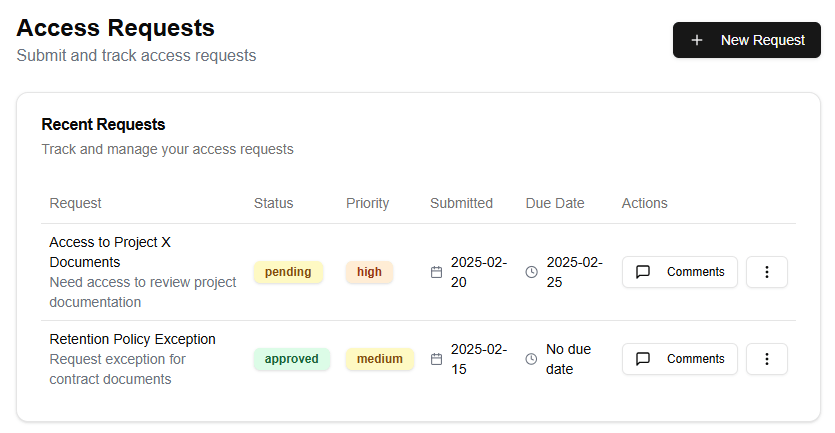

Data Loss Prevention (DLP) is the process of identifying, monitoring, and controlling sensitive or confidential information in order to prevent unauthorized access, use, disclosure, disruption, modification, or destruction. This is especially important when it comes to SharePoint, as it’s a platform that allows users to share and collaborate on documents, which can lead to data breaches if not properly secured.
Best Practices for Protecting Information
- Define Your Data: The first step in protecting information within SharePoint is to define what constitutes sensitive or confidential data. This could include things like employee personal identifiable information (PII), financial data, intellectual property, and more. Once you have defined your data, you can begin implementing controls to protect it.
- Use Access Controls: Implementing access controls is crucial for preventing unauthorized access to sensitive data within SharePoint. This includes setting permissions at the site, library, or list level, as well as using features like permissions inheritance and exception handling.
- Limit Data Sharing: One of the biggest risks when sharing information within SharePoint is that it can be shared too broadly. To mitigate this risk, set limits on who can share data and implement restrictions on sharing certain types of content.
- Use Encryption: Encrypting sensitive data within SharePoint is an effective way to prevent unauthorized access. This can be done at the site or library level using features like encryption and decryption.
- Monitor User Activity: Monitoring user activity is another important step in preventing data loss within SharePoint. This includes tracking who has accessed or modified sensitive data, as well as detecting unusual patterns of behavior.
- Implement Auditing: Auditing is an essential feature for tracking and monitoring changes to sensitive data within SharePoint. This can help identify potential security breaches early on.
- Use Third-Party Tools: Finally, consider using third-party tools to further enhance the security features within SharePoint. There are many third-party DLP solutions available that can integrate with SharePoint to provide additional protection.
Features to Use
- Site Permissions: SharePoint site permissions allow you to control who has access to a site and what actions they can perform.
- Library and List Permissions: Library and list permissions allow you to control who has access to specific lists or libraries within a site.
- Permissions Inheritance: Permissions inheritance allows you to set permissions at the site level that are automatically applied to all sub-sites, libraries, or lists.
- Exception Handling: Exception handling allows you to define specific exceptions to permission rules, such as allowing certain users to bypass certain restrictions.
- Encryption and Decryption: SharePoint’s encryption and decryption features allow you to encrypt sensitive data within a site or library, making it unreadable without the proper keys.
- Auditing: SharePoint’s auditing feature allows you to track changes to sensitive data, including who made the change, when, and what was changed.
- Site Collection Features: Site collection features include things like content type management, workflow automation, and more. These features can help streamline collaboration and information sharing within a site or site collection.
By following these best practices and utilizing SharePoint’s built-in security features, you can effectively protect sensitive data and prevent data loss within your organization.
SharePoint Data Loss Prevention is an essential feature for organizations that rely on collaboration platforms like Microsoft SharePoint. With the increasing threat of data breaches and cyber attacks, it’s crucial to implement measures that prevent sensitive information from being shared or leaked unintentionally.
Best Practices for Protecting Information:
- Classify and categorize your data: Identify sensitive information and categorize it based on its level of sensitivity. This will help you determine which features to use and how to apply them.
- Use the SharePoint DLP template: Microsoft provides a pre-built DLP template that helps you identify and classify sensitive information. You can customize this template to fit your organization’s needs.
- Implement policies and rules: Create custom policies and rules to restrict access to sensitive information. For example, you can set up a rule that prevents users from downloading or printing certain documents.
- Monitor and audit: Regularly monitor and audit user activity to detect potential data breaches early on. This includes tracking changes to documents and monitoring user behavior.
- Educate users: Train your employees on the importance of data protection and how to use SharePoint’s DLP features effectively.
Features to Use Within SharePoint:
- Information Rights Management (IRM): IRM allows you to apply permissions to documents and restrict who can access or modify them.
- Content Organizer: This feature helps you categorize and classify content based on its sensitivity level, making it easier to manage and protect.
- Auditing: SharePoint’s auditing feature provides detailed logs of user activity, helping you detect potential data breaches and track changes to sensitive information.
- Policy-driven controls: Use policy-driven controls to restrict access to certain documents or sites based on a user’s role, department, or permissions.
- Data Loss Prevention (DLP) policies: Create custom DLP policies that identify and flag sensitive information, such as credit card numbers or social security numbers.
Some common scenarios where you might use these features include:
- Restricting access to financial reports only to authorized personnel
- Preventing employees from sharing confidential company data on external websites or social media platforms
- Tracking changes to sensitive documents and alerting administrators of potential data breaches
- Applying permissions to contracts or agreements that require confidentiality
By following best practices and using SharePoint’s DLP features, you can significantly reduce the risk of data loss and protect your organization’s sensitive information.
SharePoint Data Loss Prevention: Best Practices for Protecting Information and Features to Use Within SharePoint
As an organization, protecting sensitive information is crucial in today’s digital age. With the rise of cloud-based collaboration tools like Microsoft SharePoint, it’s essential to implement data loss prevention (DLP) measures to safeguard your company’s confidential data.
SharePoint provides a robust set of features that enable organizations to control and monitor data sharing within the platform. In this article, we’ll explore best practices for protecting information in SharePoint and highlight key features to utilize for DLP.
Best Practices for Protecting Information
- Classify Sensitive Data: Identify sensitive information such as intellectual property, financial data, or personally identifiable information (PII) and classify it accordingly. This helps you apply the right security controls to prevent unauthorized access.
- Use SharePoint’s Built-in Content Classification: Leverage SharePoint’s built-in content classification feature to automatically categorize and classify your documents based on their contents.
- Implement Access Control: Restrict access to sensitive information by assigning proper permissions, roles, or groups. This ensures that only authorized personnel can view or edit confidential data.
- Monitor and Log Data Activity: Enable logging and monitoring of SharePoint activity to track who’s accessing, modifying, or sharing sensitive information. This helps you detect potential security breaches in real-time.
- Regularly Back Up Your Data: Regularly back up your SharePoint data to prevent data loss in case of unexpected events like server failures or cyber attacks.
- Conduct Regular Audits and Compliance Checks: Periodically audit and check compliance with organizational policies, regulatory requirements, and industry standards to ensure that your DLP measures are effective.
SharePoint Features for Data Loss Prevention
- Permissions and Access Control: SharePoint’s permission-based access control allows you to restrict who can view, edit, or share sensitive information.
- Site and Library Permissions: Configure site and library permissions to limit access to specific documents, folders, or sites containing sensitive data.
- File-Level Security: Use file-level security features like Microsoft Information Protection (MIP) to apply encryption, digitally sign, or control access to individual files.
- Microsoft Azure Information Protection (AIP): Integrate AIP with SharePoint to automatically classify and protect sensitive information using machine learning-based algorithms.
- SharePoint Search Query Logging: Enable search query logging to track who’s searching for specific keywords or phrases related to sensitive data.
- SharePoint Audit Log: Utilize the audit log feature to monitor and review user activity, including login attempts, file access, and other security-related events.
- Third-Party Integration: Integrate SharePoint with third-party DLP tools or software solutions to enhance its built-in features and provide a more comprehensive approach to data protection.
By implementing these best practices and utilizing the various SharePoint features outlined above, you can significantly reduce the risk of data loss and ensure that your organization’s sensitive information remains protected.
SharePoint data loss prevention is an essential aspect of protecting sensitive information within your organization. As you work with this powerful collaboration platform, it’s crucial to understand the best practices for safeguarding your data and leveraging its built-in features to ensure compliance.
To start, let’s define what data loss prevention (DLP) means in the context of SharePoint. In essence, DLP refers to the measures taken to prevent unauthorized access, disclosure, disruption, modification, or destruction of sensitive information stored within your SharePoint environment. This includes confidential documents, intellectual property, and personally identifiable information (PII).
So, what are some best practices for protecting information within SharePoint? Here are a few:
- Classify and categorize: Begin by classifying your data into categories based on sensitivity, confidentiality, or compliance requirements. This will help you identify the most critical information that requires additional protection.
- Use permissions wisely: Implement role-based access control (RBAC) to restrict access to sensitive information. Ensure that only authorized personnel have permission to view, edit, or share specific documents and lists.
- Set up site collections: Organize your SharePoint environment into logical site collections based on business needs, teams, or departments. This will help you apply targeted DLP measures and maintain better control over data sharing.
- Leverage Information Rights Management (IRM): IRM allows you to apply digital rights management (DRM) controls to documents within SharePoint. This enables you to restrict printing, copying, or forwarding sensitive information.
- Implement data encryption: Encrypt sensitive data at rest and in transit using tools like Microsoft Azure Information Protection or third-party solutions. This adds an additional layer of security against unauthorized access.
Now that we’ve covered some best practices for protecting information within SharePoint, let’s explore the features you can use to implement these measures:
- Site permissions: Set custom permissions for each site, allowing you to control who can access specific content.
- List and library permissions: Apply permissions at the list or library level to restrict access to specific documents or items.
- IRM integration: Seamlessly integrate IRM with SharePoint to apply DRM controls to sensitive documents.
- Auditing and logging: Leverage SharePoint’s auditing and logging features to track user activity, identify potential security incidents, and monitor compliance.
- Data encryption: Utilize Microsoft Azure Information Protection (AIP) or third-party solutions to encrypt data at rest and in transit within your SharePoint environment.
By following these best practices and utilizing the built-in features of SharePoint, you’ll be well on your way to protecting sensitive information and ensuring the security and integrity of your organization’s data.