As organizations rely more heavily on Microsoft’s SharePoint platform to manage and store their data, it is increasingly important to ensure compliance with regulatory requirements such as GDPR, HIPAA, and SOX. One critical aspect of achieving compliance is auditing, which involves tracking and recording all changes made to sensitive information within the organization.
To enhance the core SharePoint versioning history features, check out the following custom developed SharePoint web parts and then read more about auditing best practices and features below.
Version History Manager Web Part
The Version History web part displays all versions of a file.

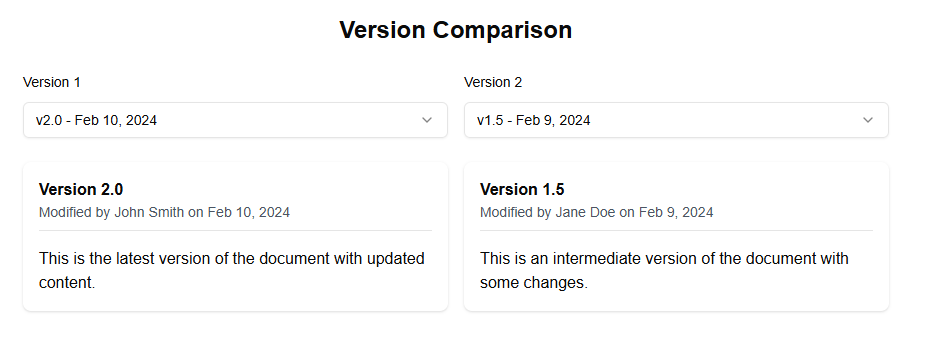
Version Comparison Web Part
The Version Comparison web part allows you to compare two versions of a document.
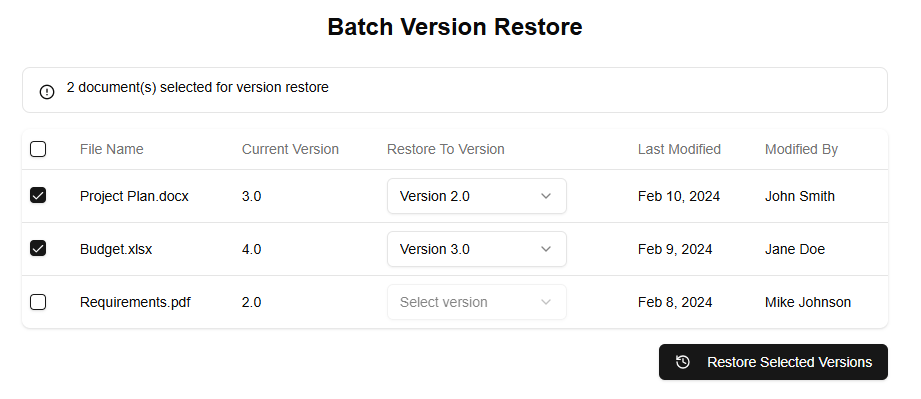
Version Batch Operations Web Part
The Batch Version Restore web part allows you to restore multiple files to previous versions at once.
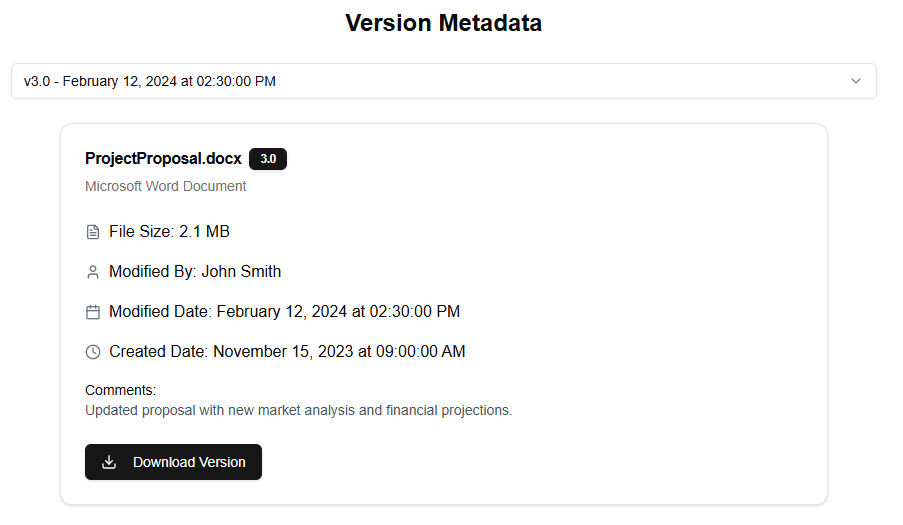
Version Detailed Metadata Web Part
The Version Detailed Metadata web part displays detailed information about a specific version of a file.
Auditing in SharePoint provides a way for organizations to keep track of all changes made to documents, lists, and libraries, allowing them to maintain a clear audit trail that can be used to demonstrate compliance with regulatory requirements. In this article, we will explore the best practices for SharePoint version auditing and highlight the features within SharePoint that make it easy to implement an effective audit process.
Why is Auditing Important in SharePoint?
Before we dive into the best practices and features of SharePoint version auditing, let’s first discuss why auditing is so important in SharePoint. When organizations store sensitive information such as financial data or personal identifiable information (PII), they must ensure that all changes made to this information are tracked and recorded. This is because regulatory requirements such as GDPR, HIPAA, and SOX require organizations to maintain a clear audit trail that can be used to demonstrate compliance.
Without auditing, it would be difficult for organizations to track and record changes made to sensitive information, making it impossible to demonstrate compliance with regulatory requirements. Furthermore, auditing helps organizations identify and prevent data breaches by tracking who has accessed or modified sensitive information.
Best Practices for SharePoint Version Auditing
Now that we have discussed the importance of auditing in SharePoint, let’s explore some best practices for implementing an effective audit process within the platform:
- Define Your Audit Scope: Before you start auditing, it is important to define what you want to audit and why. This will help you determine which features of SharePoint you need to enable for auditing.
- Enable Auditing: Once you have defined your audit scope, you can enable auditing in SharePoint. To do this, go to the SharePoint site settings page and select “Auditing” from the left-hand menu. From here, you can choose which types of changes you want to track (e.g., create, update, delete) and which users or groups you want to audit.
- Set Up Auditing for Specific Site Collections: You can also set up auditing for specific site collections within SharePoint. To do this, go to the site settings page for the site collection and select “Auditing” from the left-hand menu. From here, you can choose which types of changes you want to track and which users or groups you want to audit.
- Use SharePoint’s Built-In Auditing Features: SharePoint has a number of built-in features that make it easy to implement an effective audit process. For example, you can use SharePoint’s workflow feature to automate the auditing process and ensure that all changes are tracked and recorded.
- Monitor Auditing Logs: Finally, it is important to monitor your auditing logs regularly to ensure that all changes are being tracked and recorded correctly. You can do this by going to the SharePoint site settings page and selecting “Auditing” from the left-hand menu. From here, you can view a history of all audited changes and take action if you find any errors or discrepancies.
SharePoint Auditing Features
In addition to these best practices, SharePoint has a number of features that make it easy to implement an effective audit process:
- Audit Logs: SharePoint’s audit logs provide a comprehensive record of all changes made to documents, lists, and libraries within the platform. You can use these logs to track who has accessed or modified sensitive information.
- Workflow: SharePoint’s workflow feature allows you to automate the auditing process and ensure that all changes are tracked and recorded correctly. You can create custom workflows that trigger specific actions based on certain conditions (e.g., when a document is updated).
- Site Collection Auditing: SharePoint allows you to set up auditing for specific site collections within the platform. This feature provides a way to track changes made to documents, lists, and libraries across multiple sites.
- Policy-Based Management: SharePoint’s policy-based management feature allows you to create custom policies that govern how data is accessed and modified within the platform. You can use these policies to ensure compliance with regulatory requirements and maintain a clear audit trail.
Conclusion
In this article, we have explored the best practices for SharePoint version auditing and highlighted the features within SharePoint that make it easy to implement an effective audit process. By following these best practices and using SharePoint’s built-in auditing features, organizations can maintain a clear audit trail that can be used to demonstrate compliance with regulatory requirements.